About
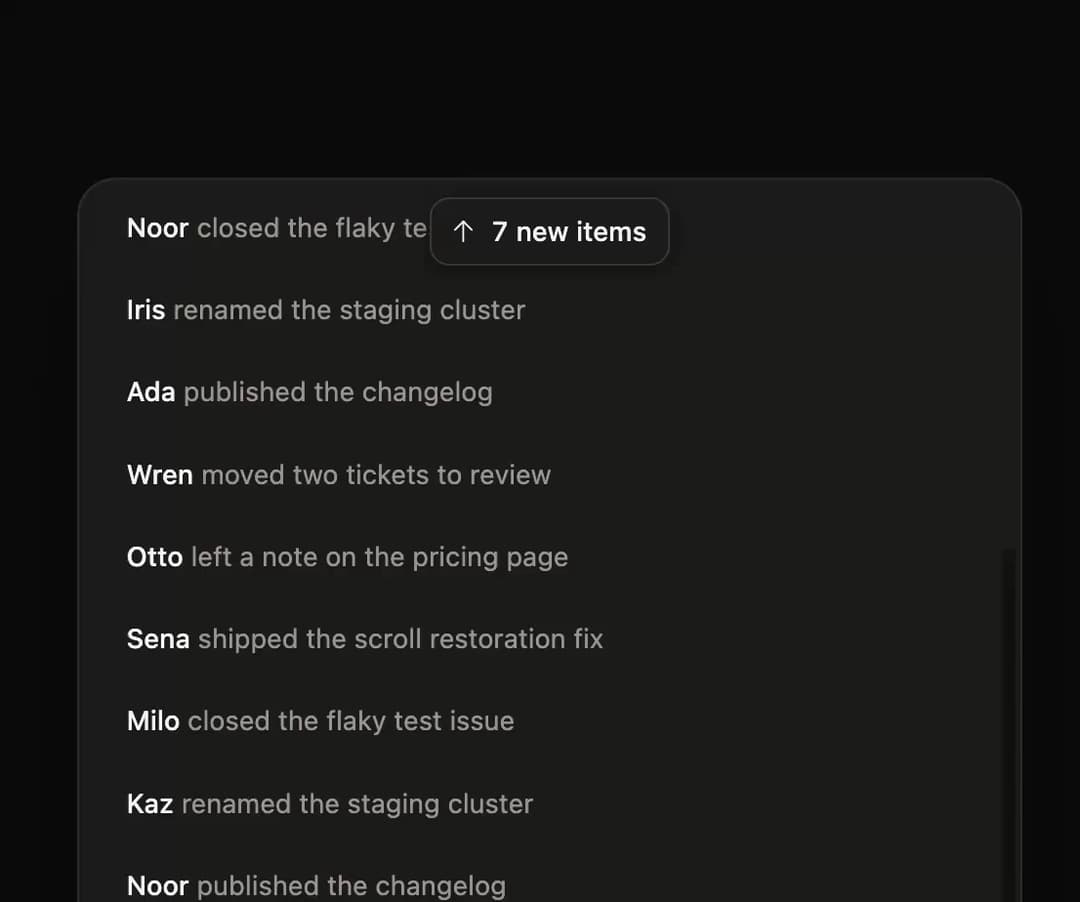
A floating pill that appears when new items arrive in a scrollable feed and jumps you back to the newest items on click, with an accompanying scroll hook.
Built with React and Tailwind. Copy the prompt and paste it into Claude Code, Cursor or Lovable: your agent adds New Items Pill to your project and fits it to your theme.
Code
How New Items Pill is used: the demo's code. The component's own source comes with a free account.
Usage.tsx
"use client";

import { NewItemsPill, useNewItems } from "@/components/ui/new-items-pill";
import * as React from "react";
import { motion } from "motion/react";

const WHO = ["Wren", "Ada", "Iris", "Noor", "Kaz", "Milo", "Sena", "Otto"];
const WHAT = [
  "shipped the scroll restoration fix",
  "left a note on the pricing page",
  "moved two tickets to review",
  "published the changelog",
  "renamed the staging cluster",
  "closed the flaky test issue",
];

const MASK =
  "linear-gradient(to bottom, transparent, black 14px, black calc(100% - 22px), transparent)";

function Feed() {
  const [ids, setIds] = React.useState<number[]>(() =>
    Array.from({ length: 17 }, (_, i) => 16 - i),
  );
  const [pending, setPending] = React.useState(3);
  const [marked, setMarked] = React.useState(0);
  const next = React.useRef(17);

  const { scrollProps, jump } = useNewItems<HTMLDivElement>({
    itemCount: ids.length,
  });
  const scroller = scrollProps.ref;

  React.useLayoutEffect(() => {
    const el = scroller.current;
    if (el) el.scrollTop = 200;
  }, [scroller]);

  React.useEffect(() => {
    const timer = setInterval(() => {
      setIds((prev) => [next.current + 1, ...prev]);
      next.current += 1;
      setPending((p) => Math.min(p + 1, 99));
    }, 2600);
    return () => clearInterval(timer);
  }, []);

  React.useEffect(() => {
    if (marked === 0) return;
    const timer = setTimeout(() => setMarked(0), 1600);
    return () => clearTimeout(timer);
  }, [marked]);

  const handleJump = () => {
    const caught = jump();
    setMarked(caught || pending);
    setPending(0);
  };

  return (
    <div className="relative h-full w-full">
      <div
        {...scrollProps}
        role="region"
        aria-label="Team activity"
        style={{ ...scrollProps.style, WebkitMaskImage: MASK, maskImage: MASK }}
        className="h-full overflow-y-auto overscroll-contain px-3 py-3 outline-none"
      >
        {ids.map((id, i) => (
          <article
            key={id}
            className="relative rounded-[8px] px-2.5 py-[9px] text-[12.5px] leading-relaxed"
          >
            <motion.span
              aria-hidden
              className="pointer-events-none absolute inset-0 rounded-[8px] bg-[#4568FF]/[0.09] dark:bg-[#93B0FF]/[0.12]"
              initial={false}
              animate={{ opacity: i < marked ? 1 : 0 }}
              transition={{ duration: 0.45, ease: [0.23, 1, 0.32, 1] }}
            />
            <span className="relative font-medium text-stone-900 dark:text-stone-100">
              {WHO[id % WHO.length]}
            </span>{" "}
            <span className="relative text-stone-500 dark:text-stone-400">
              {WHAT[id % WHAT.length]}
            </span>
          </article>
        ))}
      </div>
      <NewItemsPill count={pending} onJump={handleJump} className="px-3" />
    </div>
  );
}

export default function NewItemsPillDemo() {
  return (
    <div className="flex min-h-[440px] w-full items-center justify-center bg-transparent p-8">
      <div className="relative h-[400px] w-full max-w-[440px] overflow-hidden rounded-[18px] border border-stone-200/80 bg-white shadow-[0_1px_2px_rgba(0,0,0,0.04),0_28px_56px_-24px_rgba(0,0,0,0.16)] dark:border-white/10 dark:bg-[#1D1D1A] dark:shadow-[0_28px_56px_-22px_rgba(0,0,0,0.7)]">
        <Feed />
      </div>
    </div>
  );
}
Dependencies
More by Özer
View all

Password Strength
1.3K
OTP Input
824
Loading Button
617
Progress Bar
594
Reorder List
318
Task Steps
284
Hold to Confirm
255
Reading Progress
174