
About
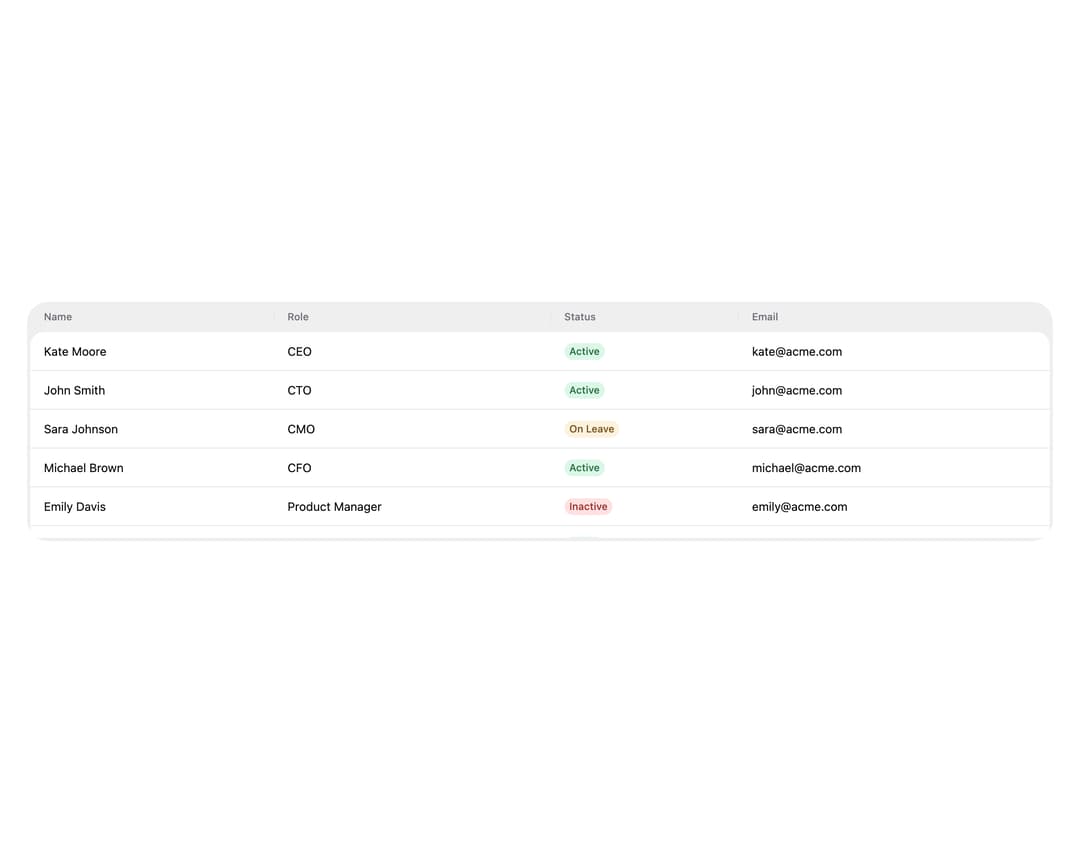
HeroUI v3 Table — data table with sorting, selection, custom cells, expandable rows, pagination, column resizing, empty state and async loading.
Built with React and Tailwind. Copy the prompt and paste it into Claude Code, Cursor or Lovable: your agent adds HeroUI Table to your project and fits it to your theme.
Code
How HeroUI Table is used: the demo's code. The component's own source comes with a free account.
Usage.tsx
"use client"

import { Table } from "@/components/ui/heroui-table"
import { Chip, Spinner } from "@heroui/react"
import { useCallback, useRef, useState } from "react"

interface User {
  id: number
  name: string
  role: string
  status: string
  email: string
}

const statusColorMap: Record<string, "success" | "danger" | "warning"> = {
  Active: "success",
  Inactive: "danger",
  "On Leave": "warning",
}

const allUsers: User[] = [
  { email: "[email protected]", id: 1, name: "Kate Moore", role: "CEO", status: "Active" },
  { email: "[email protected]", id: 2, name: "John Smith", role: "CTO", status: "Active" },
  { email: "[email protected]", id: 3, name: "Sara Johnson", role: "CMO", status: "On Leave" },
  { email: "[email protected]", id: 4, name: "Michael Brown", role: "CFO", status: "Active" },
  {
    email: "[email protected]",
    id: 5,
    name: "Emily Davis",
    role: "Product Manager",
    status: "Inactive",
  },
  { email: "[email protected]", id: 6, name: "Davis Wilson", role: "Lead Designer", status: "Active" },
  {
    email: "[email protected]",
    id: 7,
    name: "Olivia Martinez",
    role: "Frontend Engineer",
    status: "Active",
  },
  {
    email: "[email protected]",
    id: 8,
    name: "James Taylor",
    role: "Backend Engineer",
    status: "Active",
  },
  {
    email: "[email protected]",
    id: 9,
    name: "Sophia Anderson",
    role: "QA Engineer",
    status: "On Leave",
  },
  { email: "[email protected]", id: 10, name: "Liam Thomas", role: "DevOps Engineer", status: "Active" },
  {
    email: "[email protected]",
    id: 11,
    name: "Lucas Martinez",
    role: "Product Manager",
    status: "Active",
  },
  {
    email: "[email protected]",
    id: 12,
    name: "Emma Johnson",
    role: "Frontend Engineer",
    status: "Active",
  },
  { email: "[email protected]", id: 13, name: "Noah Davis", role: "Backend Engineer", status: "Active" },
  { email: "[email protected]", id: 14, name: "Ava Wilson", role: "Lead Designer", status: "Active" },
  {
    email: "[email protected]",
    id: 15,
    name: "Oliver Martinez",
    role: "Frontend Engineer",
    status: "Active",
  },
  {
    email: "[email protected]",
    id: 16,
    name: "Isabella Johnson",
    role: "Backend Engineer",
    status: "Active",
  },
  { email: "[email protected]", id: 17, name: "Mia Davis", role: "Lead Designer", status: "Active" },
  {
    email: "[email protected]",
    id: 18,
    name: "William Wilson",
    role: "Frontend Engineer",
    status: "Active",
  },
]

const ITEMS_PER_PAGE = 6

const columns = [
  { id: "name", name: "Name" },
  { id: "role", name: "Role" },
  { id: "status", name: "Status" },
  { id: "email", name: "Email" },
]

export default function AsyncLoading() {
  const [items, setItems] = useState<User[]>(() => allUsers.slice(0, ITEMS_PER_PAGE))
  const [isLoading, setIsLoading] = useState(false)
  const isLoadingRef = useRef(false)
  const hasMore = items.length < allUsers.length

  const loadMore = useCallback(() => {
    if (!hasMore || isLoadingRef.current) return
    isLoadingRef.current = true
    setIsLoading(true)
    setTimeout(() => {
      setItems((prev) => allUsers.slice(0, prev.length + ITEMS_PER_PAGE))
      setIsLoading(false)
      requestAnimationFrame(() => {
        isLoadingRef.current = false
      })
    }, 1500)
  }, [hasMore])

  return (
    <div className="w-full p-8">
    <Table>
      <Table.ScrollContainer className="h-[280px] overflow-y-auto">
        <Table.Content aria-label="Async loading table" className="min-w-[600px]">
          <Table.Header className="sticky top-0 z-10 bg-surface-secondary">
            {columns.map((col) => (
              <Table.Column key={col.id} id={col.id} isRowHeader={col.id === "name"}>
                {col.name}
              </Table.Column>
            ))}
          </Table.Header>
          <Table.Body>
            <Table.Collection items={items}>
              {(user) => (
                <Table.Row>
                  <Table.Cell>{user.name}</Table.Cell>
                  <Table.Cell>{user.role}</Table.Cell>
                  <Table.Cell>
                    <Chip color={statusColorMap[user.status]} size="sm" variant="soft">
                      {user.status}
                    </Chip>
                  </Table.Cell>
                  <Table.Cell>{user.email}</Table.Cell>
                </Table.Row>
              )}
            </Table.Collection>
            {!!hasMore && (
              <Table.LoadMore isLoading={isLoading} scrollOffset={0} onLoadMore={loadMore}>
                <Table.LoadMoreContent>
                  <Spinner size="md" />
                </Table.LoadMoreContent>
              </Table.LoadMore>
            )}
          </Table.Body>
        </Table.Content>
      </Table.ScrollContainer>
    </Table>
    </div>
  )
}
Dependencies
More by Hero Ui
View all

DatePicker
467
Chip
442
The Pagination
361
HeroUI Color Picker
107
Skeleton
105
HeroUI Disclosure Group
94
HeroUI AlertDialog
80
ComboBox
75