
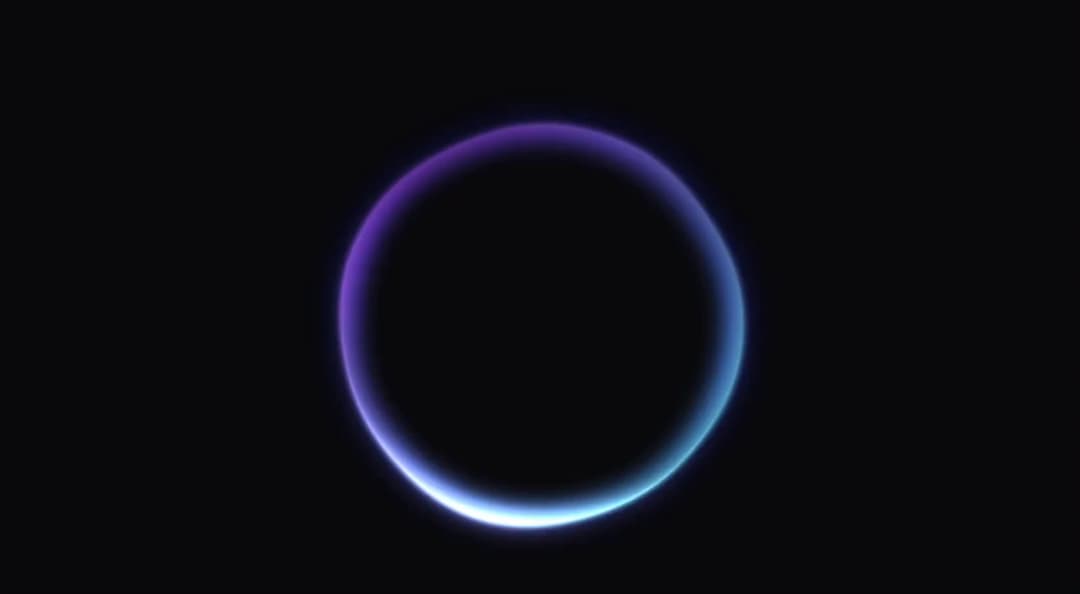
The VoicePoweredOrb is an interactive WebGL component that renders a mesmerizing, shader-based orb dynamically responding to voice input through the microphone. It features complex GLSL shaders with procedural noise, color shifting, and lighting effects that create fluid, organic animations where the orb's rotation speed and visual intensity modulate in real-time based on audio levels. This component could be used in voice-controlled applications, audio visualizations, interactive art installations, AI assistants, music players, or chat interfaces requiring sophisticated visual feedback for voice activity. Note: Might not work in sandbox due to browser restrictions but will work in your codebase.
Built with React and Tailwind. Copy the prompt and paste it into Claude Code, Cursor or Lovable: your agent adds Voice Powered Orb to your project and fits it to your theme.
Code
How Voice Powered Orb is used: the demo's code. The component's own source comes with a free account.
Usage.tsx
"use client";

import React, { useState } from "react";
import { VoicePoweredOrb } from "@/components/ui/voice-powered-orb";
import { Button } from "@/components/ui/button";
import { Mic, MicOff } from "lucide-react";

export default function VoicePoweredOrbPage() {
  const [isRecording, setIsRecording] = useState(false);
  const [voiceDetected, setVoiceDetected] = useState(false);

  const toggleRecording = () => {
    setIsRecording(!isRecording);
  };

  return (
    <div className="min-h-screen d flex items-center justify-center p-8">
      <div className="flex flex-col items-center space-y-8">
        {/* Orb */}
        <div className="w-96 h-96 relative">
          <VoicePoweredOrb
            enableVoiceControl={isRecording}
            className="rounded-xl overflow-hidden shadow-2xl"
            onVoiceDetected={setVoiceDetected}
          />
        </div>

        {/* Control Button */}
        <Button
          onClick={toggleRecording}
          variant={isRecording ? "destructive" : "default"}
          size="lg"
          className="px-8 py-3"
        >
          {isRecording ? (
            <>
              <MicOff className="w-5 h-5 mr-3" />
              Stop Recording
            </>
          ) : (
            <>
              <Mic className="w-5 h-5 mr-3" />
              Start Recording
            </>
          )}
        </Button>

        {/* Simple Instructions */}
        <p className="text-muted-foreground text-center max-w-md">
          Click the button to enable voice control. Speak to see the orb respond to your voice with subtle movements.
        </p>
      </div>
    </div>
  );
}
Dependencies
More by Isaiah
View all
Agent Plan
2.2K
Video Scroll Hero
1.4K
Reveal Text
1.1K
Leads Data Table
943
Portfolio Gallery
939
Message Dock
841
Ruler Carousel
628
Coach Scheduling Card
531
More in Shaders
View all
Glass Fold
279

Phosphor 30
293

Shader Animation
3.7K
Wave
693
Black Hole
27
Shader Background
2K
Shader Lines
2.3K
Liquid Glass Logo Reveal
629


