
About
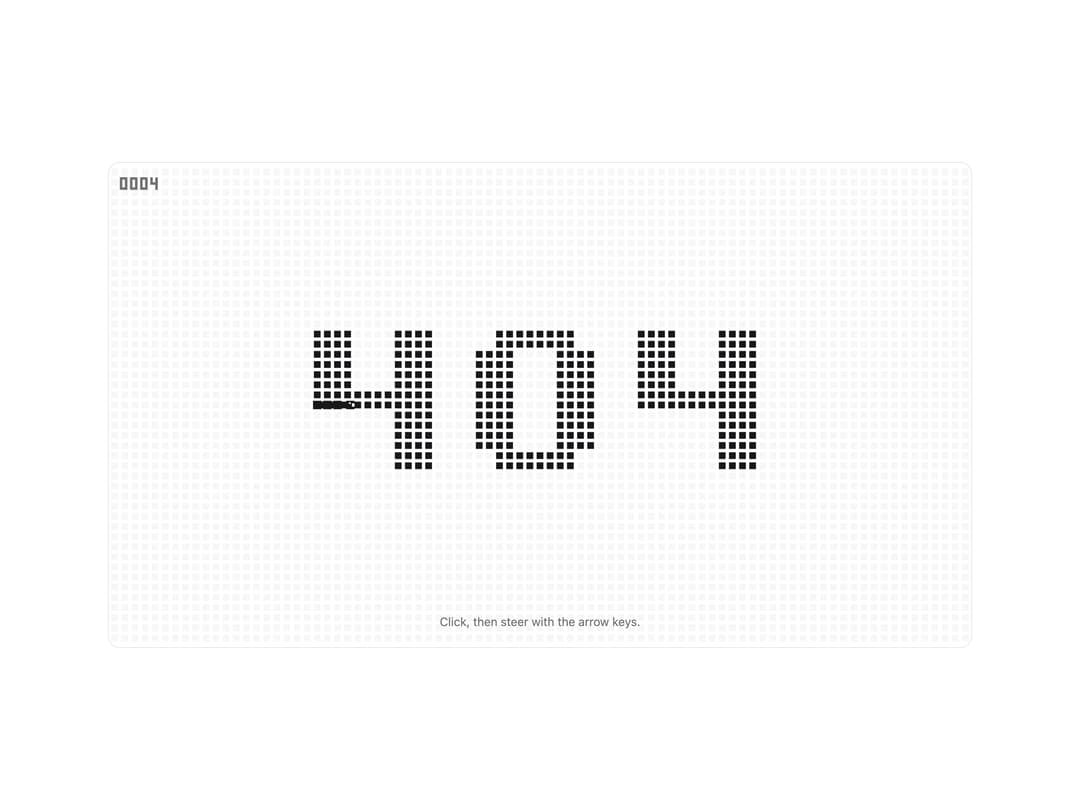
Dot-matrix 404 where every dot is food: a Nokia-style snake eats the digits, then they come back. Arrow keys, WASD, or a swipe take over.
Built with React and Tailwind. Copy the prompt and paste it into Claude Code, Cursor or Lovable: your agent adds Snake 404 to your project and fits it to your theme.
Code
How Snake 404 is used: the demo's code. The component's own source comes with a free account.
Usage.tsx
"use client"

import { useState } from "react"

import { Snake404 } from "@/components/ui/snake-404"
import { cn } from "@/lib/utils"

const settings = {
  code: "404",
  cellSize: 12,
  speed: 14,
  maxLength: 32,
  lcd: false,
  grid: true,
  smooth: true,
  score: true,
  playable: true,
}

export default function Snake404Demo(props: Partial<typeof settings>) {
  const s = { ...settings, ...props }
  const [playing, setPlaying] = useState(false)

  return (
    <div className="flex min-h-[520px] w-full items-center justify-center bg-background p-4">
      <div className="relative aspect-[16/9] min-h-[360px] w-full max-w-5xl overflow-hidden rounded-xl border border-border bg-background">
        <Snake404
          code={s.code}
          cellSize={s.cellSize}
          speed={s.speed}
          maxLength={s.maxLength}
          lcd={s.lcd}
          grid={s.grid}
          smooth={s.smooth}
          score={s.score}
          playable={s.playable}
          onPlayChange={setPlaying}
        />
        <p
          className={cn(
            "pointer-events-none absolute inset-x-0 bottom-5 px-6 text-center text-sm",
            s.lcd ? "text-[#43523D]" : "text-muted-foreground"
          )}
        >
          {!s.playable
            ? "This page could not be found."
            : playing
              ? "Esc hands the snake back."
              : "Click, then steer with the arrow keys."}
        </p>
      </div>
    </div>
  )
}
More by jay sharma
View all

Live Orb
357
Chrome Button
184
Frame Button
133
Shader Metal
88
Highlight Button
81
ASCII Fluid
76
Brutal Button
64
Motion Button
61