
About
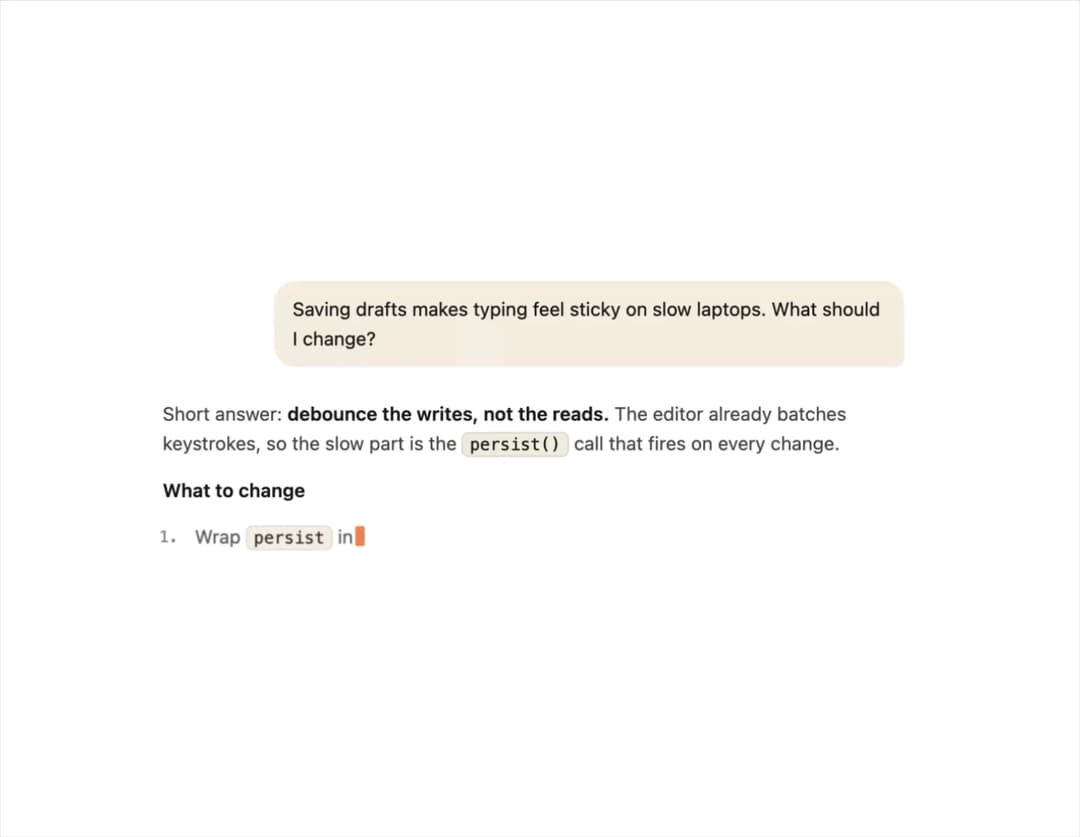
A chat message renderer that progressively parses and displays markdown as AI response tokens stream in, with safe inline formatting, copyable code blocks, and a blinking caret.
Built with React and Tailwind. Copy the prompt and paste it into Claude Code, Cursor or Lovable: your agent adds Streaming Message to your project and fits it to your theme.
Code
How Streaming Message is used: the demo's code. The component's own source comes with a free account.
Usage.tsx
"use client";

import StreamingMessage, {
  SAMPLE_STREAMING_MARKDOWN,
} from "@/components/ui/streaming-message";
import { useEffect, useState } from "react";

const QUESTION =
  "Saving drafts makes typing feel sticky on slow laptops. What should I change?";

// Token-sized chunks: a word with its leading whitespace, mirroring how tokens arrive from a model.
const CHUNKS = SAMPLE_STREAMING_MARKDOWN.match(/\s*\S{1,5}/g) ?? [];
const OFFSETS = CHUNKS.reduce<number[]>(
  (acc, chunk, i) => [...acc, (i === 0 ? 0 : acc[i - 1]) + chunk.length],
  [],
);
const SPEED_MS = 32;

export default function StreamingMessageDemo() {
  const [count, setCount] = useState(0);
  const done = count >= CHUNKS.length;

  useEffect(() => {
    if (done) return;
    // A short pause before the first token, like a real time-to-first-token.
    const delay = count === 0 ? 600 : SPEED_MS;
    const id = window.setTimeout(() => setCount((c) => c + 1), delay);
    return () => window.clearTimeout(id);
  }, [done, count]);

  const content = SAMPLE_STREAMING_MARKDOWN.slice(
    0,
    count === 0 ? 0 : OFFSETS[count - 1],
  );

  return (
    <div className="flex w-full max-w-[600px] flex-col gap-6 p-6">
      <StreamingMessage role="user" content={QUESTION} />
      <StreamingMessage content={content} streaming={!done} />
    </div>
  );
}
Dependencies
More by Isaiah
View all
Agent Plan
2.2K
Video Scroll Hero
1.4K
Voice Powered Orb
1.4K
Reveal Text
1.1K
Leads Data Table
943
Portfolio Gallery
939
Message Dock
842
Ruler Carousel
628
More in AI chats
View all

AI Actions
326
Agent Chat
18
Attachments
22
Commit
23
Message Thread
45

System Message
58
Suggestions
30

AI Task List
167


