
About
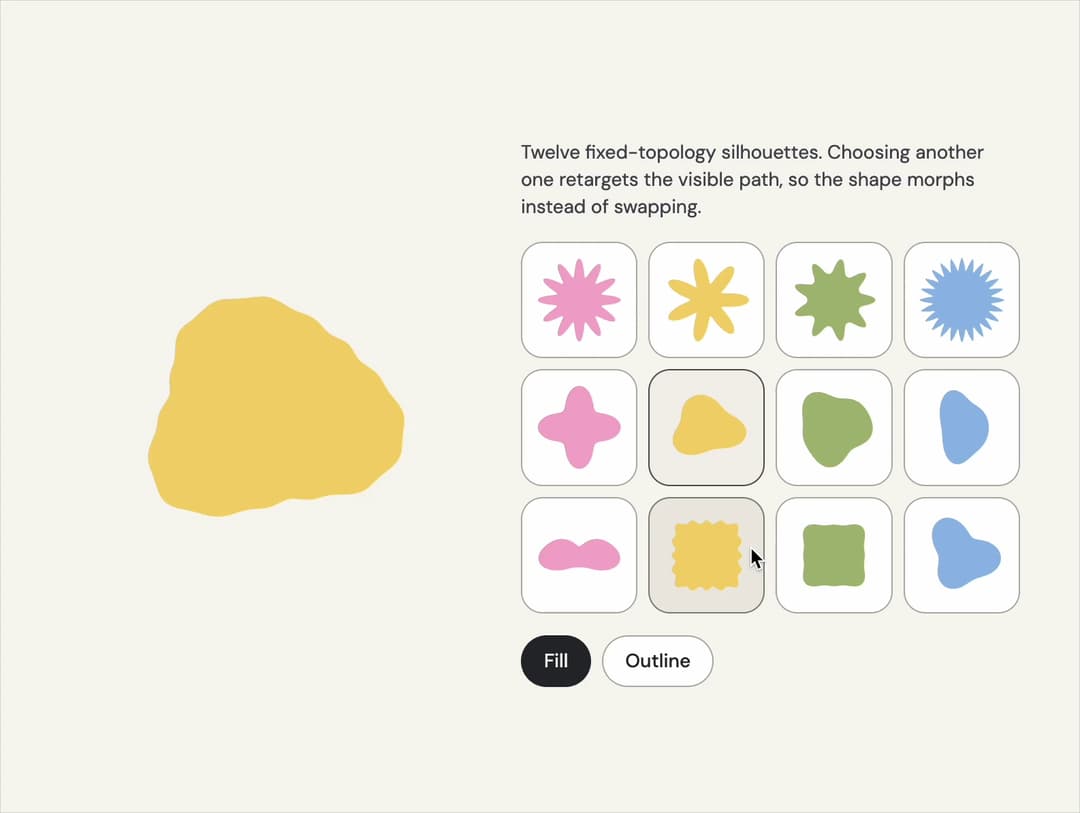
One shape studio: twelve compatible living contours, layered artwork and the complete original mask inventory. Compose it here, then take the SVG or React code.
Built with React and Tailwind. Copy the prompt and paste it into Claude Code, Cursor or Lovable: your agent adds Shape to your project and fits it to your theme.
Code
How Shape is used: the demo's code. The component's own source comes with a free account.
Usage.tsx
"use client";

import * as React from "react";
import { ShapeMorph, signatureShapeNames, type SignatureShapeName } from "@/components/ui/shape";

const tones = ["var(--v-pink)", "var(--v-yellow)", "var(--v-olive)", "var(--v-blue)"];

/** The demo brings its own 000h canvas, so it looks right on any host page (the component package sets nothing global). */
function DemoSurface({ children }: { children: import("react").ReactNode }) {
  return <div className="grid min-h-screen w-full place-items-center bg-[var(--v-canvas)] p-4 font-[family-name:var(--font-text)] text-[length:var(--fs-body)] leading-[var(--lh-body)] text-[var(--v-text)]">{children}</div>;
}

export default function Demo() {
  const [name, setName] = React.useState<SignatureShapeName>("daisy-12");
  const [variant, setVariant] = React.useState<"fill" | "outline">("fill");
  const tone = tones[Math.max(0, signatureShapeNames.indexOf(name)) % tones.length];
  return (
    <DemoSurface>
      <div className="mx-auto grid w-full max-w-3xl items-center gap-8 p-8 sm:grid-cols-[minmax(0,1fr)_minmax(0,1.2fr)]">
        <div className="mx-auto aspect-square w-full max-w-60" style={{ color: tone }}>
          <ShapeMorph name={name} variant={variant} label={`${name} silhouette`} className="h-full w-full overflow-visible" />
        </div>
        <div className="grid gap-4">
          <p className="text-sm text-[var(--v-text-2)]">Twelve fixed-topology silhouettes. Choosing another one retargets the visible path, so the shape morphs instead of swapping.</p>
          <div role="group" aria-label="Shape" className="grid grid-cols-4 gap-2">
            {signatureShapeNames.map((option, index) => (
              <button
                key={option}
                type="button"
                aria-pressed={name === option}
                aria-label={option}
                onClick={() => setName(option)}
                className="grid aspect-square place-items-center rounded-2xl border border-[var(--v-border)] bg-[var(--v-paper)] p-2 transition-colors hover:bg-[var(--v-beige)] aria-pressed:border-[var(--v-ink)] aria-pressed:bg-[var(--v-beige)]"
                style={{ color: tones[index % tones.length] }}
              >
                <ShapeMorph name={option} variant="fill" className="h-full w-full overflow-visible" />
              </button>
            ))}
          </div>
          <div role="group" aria-label="Treatment" className="flex gap-2">
            {(["fill", "outline"] as const).map((option) => (
              <button
                key={option}
                type="button"
                aria-pressed={variant === option}
                onClick={() => setVariant(option)}
                className="rounded-full border border-[var(--v-border)] bg-[var(--v-paper)] px-4 py-2 text-sm font-medium capitalize text-[var(--v-text)] transition-colors hover:bg-[var(--v-beige)] aria-pressed:border-[var(--v-ink)] aria-pressed:bg-[var(--v-ink)] aria-pressed:text-[var(--v-on-ink)]"
              >
                {option}
              </button>
            ))}
          </div>
        </div>
      </div>
    </DemoSurface>
  );
}
Dependencies
More by Sanjay Kumar
View all
Prompt Bond
123
Agent State
56
Bento Grid
42
Theme Toggle
31
Variable Proximity
19
Dock
17
Animated Icon
13
Hero Button
13